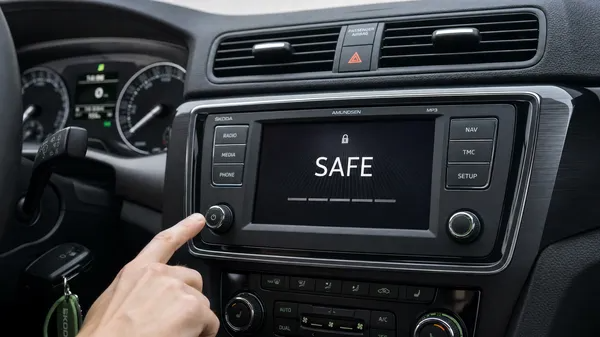

Experiencing a locked Skoda radio can be a common frustration for car owners, often occurring after a battery change, fuse replacement, or any power interruption. When your Skoda radio displays “SAFE” or prompts for a code, it means its anti-theft system has activated. This guide will walk you through the process of identifying your Skoda radio, finding its unique serial number, and correctly entering the unlock code to restore your audio system.
Understanding Skoda Radio Models and Serial Numbers
Skoda, being part of the Volkswagen Group, utilizes similar anti-theft mechanisms to VW and Audi. Your radio requires a specific 4-digit PIN code that is uniquely linked to its serial number. The serial number for Skoda radios typically begins with “SKZ” followed by 11 alphanumeric characters (e.g., SKZ1Z2L1234567).
Common Skoda Radio Models:
Skoda vehicles feature a range of infotainment systems, including:
•Swing: Often found in entry-level models, typically a standard radio unit.
•Bolero: A more advanced unit, frequently featuring a touchscreen display.
•Amundsen: A navigation-enabled system, often based on the Modular Infotainment Matrix (MIB) platform in newer vehicles.
•Columbus: A high-end navigation and multimedia system with a larger screen.
•Older Generations: Such as Symphony, Stream, or Blues units.
Locating Your SKZ Serial Number:
For most Skoda radios, the serial number is physically stamped on the metal chassis of the unit. This usually requires the radio to be removed from the dashboard. You will need specialized radio release keys (often available online or from an auto parts store) to safely extract the unit without damaging the dashboard.
Expert Tip: For some newer MIB-based units (like certain Bolero, Amundsen, or Columbus systems), you might be able to access the serial number through a hidden service menu on the display. Consult your car’s manual or search for model-specific instructions for accessing this menu, as the procedure varies.
The Skoda Radio SAFE Mode and the 60-Minute Rule
Similar to other VAG group vehicles, if an incorrect code is entered twice, your Skoda radio will enter a more restrictive “SAFE 2” mode. In this state, the radio will typically display “SAFE” and prevent further code entry attempts for a mandatory period.
To reset the “SAFE 2” lockout and allow another code entry attempt:
1.Ignition ON: Turn your car’s ignition to the “ON” position. The engine does not need to be running, but the radio must be continuously powered.
2.Radio ON: Ensure the radio is switched on and displaying the “SAFE” message.
3.Wait for 60 Minutes: Leave the radio powered on for a full 60 minutes without pressing any buttons or turning off the ignition. Interrupting this wait will reset the timer.
After the 60-minute waiting period, the display should change, allowing you to attempt code entry again.
Entering Your Skoda Radio Code
The method for entering your 4-digit PIN code can vary slightly depending on your Skoda radio model. Here are general steps:
1.Activate Code Entry: With the radio displaying “SAFE” (or after the 60-minute wait), you typically need to press and hold a combination of buttons until “1000” appears on the display. Common combinations include:
•SCAN + MODE
•TP + RDS (for older models)
•Consult your radio’s manual for the exact combination for your specific model.
2.Input Code: Use the radio’s preset buttons (usually 1-4) to enter each digit of your 4-digit code. For example, to enter ‘1234’, you would press button 1 once, button 2 twice, button 3 three times, and button 4 four times.
3.Confirm Code: Once the full 4-digit code is displayed, press and hold the same buttons you used to activate code entry (e.g., SCAN + MODE) or press the right arrow/”OK” button until the radio unlocks and begins functioning normally.
Where to Find Your Skoda Radio Code
If you don’t have your radio code, you can often find it:
•In your owner’s manual: Look for a “Radio Card” or a sticker in the original documentation.
•From a Skoda dealership: Provide your VIN and the radio’s SKZ serial number. Be aware that dealerships often charge a fee for this service.
•Through a professional online service: Services like VWCODES.com can retrieve your code quickly and reliably using your radio’s unique SKZ serial number. This is often the most convenient and fastest option if you don’t have the original documentation.
Conclusion
Unlocking your Skoda radio from SAFE mode is a straightforward process once you understand the steps and have your unique 4-digit code. Whether you’re dealing with an older Symphony unit or a modern Columbus system, the key is to correctly identify your radio’s serial number and follow the proper code entry procedure. Always keep your radio code in a safe place, and if you need assistance, reliable online services are available to help you get back to enjoying your music on the road.