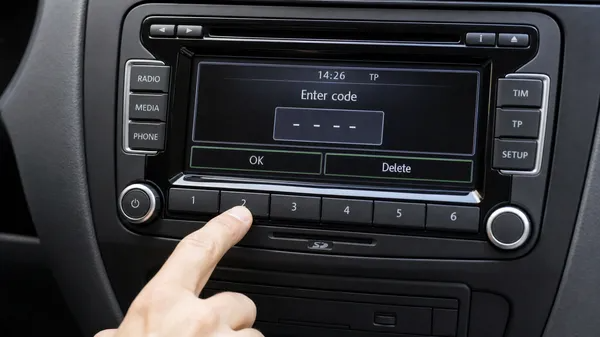

Successfully retrieving your Volkswagen radio code is a significant step, but the journey isn’t over until you’ve correctly entered it and restored your audio system. Entering the code might seem straightforward, but different VW radio models have distinct methods, and an incorrect entry can lead to the dreaded “SAFE” mode lockout. This guide provides a clear, step-by-step process for entering your 4-digit radio code, ensuring you get back to your music without a hitch.
Understanding Your VW Radio Code
Your Volkswagen radio code is a unique 4-digit PIN designed to prevent theft. It’s tied to your radio’s serial number (typically starting with “VWZ”). If your radio loses power (e.g., during a battery change or fuse replacement), it will request this code to ensure it’s still in its rightful vehicle.
General Code Entry Procedure
While specific button combinations may vary, the core process involves using the radio’s preset buttons to input the digits and then confirming the entry.
Step 1: Activate Code Entry Mode
When your radio displays “SAFE” or prompts for a code, you first need to activate the code entry screen. This usually involves pressing and holding a specific button combination until the display changes to show four dashes (e.g., “_ _ _ _”) or “1000”.
•For Older Models (e.g., Alpha, Beta, Gamma, Premium 4/5): Press and hold the SCAN and MODE buttons simultaneously for a few seconds.
•For Mid-Generation Models (e.g., Premium 7, RCD 300/310): Press and hold the Right Arrow (Seek/Scan) button or the OK button.
•For Newer Touchscreen Models (e.g., RCD 510, RNS 510, MIB systems): The code entry screen might appear automatically, or you may need to briefly press the MENU or SETUP button.
Step 2: Enter Your 4-Digit Code
Once the four dashes or “1000” appear, you will use the radio’s preset buttons (usually buttons 1 through 4) to input your code.
•Using Preset Buttons 1-4: Each button corresponds to a digit in your code. Press button 1 repeatedly to cycle through numbers 0-9 for the first digit. Do the same for button 2 for the second digit, button 3 for the third, and button 4 for the fourth.
•Example: If your code is 1234:
•Press button 1 once (for the first digit ‘1’).
•Press button 2 twice (for the second digit ‘2’).
•Press button 3 three times (for the third digit ‘3’).
•Press button 4 four times (for the fourth digit ‘4’).
•For Touchscreen Models: Simply tap the corresponding numbers on the on-screen keypad.
Step 3: Confirm Your Code
After you have entered all four digits of your code, the final step is to confirm it. This tells the radio to accept the code and unlock.
•For Older Models: Press and hold the same button combination you used to activate code entry (e.g., SCAN + MODE) for a few seconds.
•For Mid-Generation Models: Press and hold the Right Arrow (Seek/Scan) or the OK button.
•For Touchscreen Models: Press the OK or Enter button on the screen.
If the code is correct, your radio should unlock, and normal functionality will resume. If it displays “SAFE” again, you may have entered an incorrect code or used the wrong confirmation method.
What if You Enter the Wrong Code?
If you enter an incorrect code twice, your Volkswagen radio will enter “SAFE 2” mode. This is a security feature that locks the radio for a mandatory 60-minute waiting period. During this time, you must keep the ignition in the “ON” position and the radio powered on. Do not turn off the ignition or the radio, as this will reset the timer. After 60 minutes, the radio will allow you to attempt code entry again.
Conclusion
Entering your Volkswagen radio code is a simple process once you know the correct steps for your specific model. By following this guide, you can confidently restore your radio’s functionality and get back to enjoying your drives. If you’re still struggling to find your code or need further assistance, professional services are available to help you quickly and reliably.