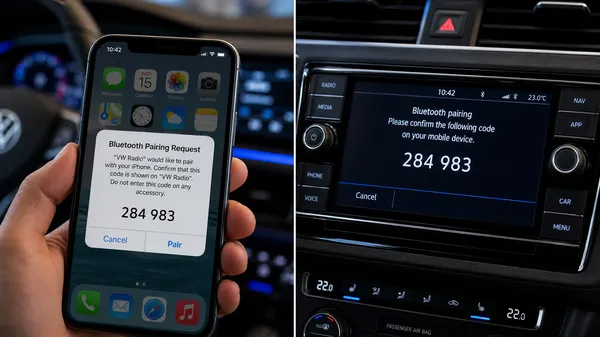

In today’s world, having a seamless Bluetooth connection in your car is essential for hands-free calling and streaming your favorite music. However, many Volkswagen owners experience frustrating pairing issues where the phone simply won’t connect to the radio. At VWCODES.com, we want to ensure your driving experience is as smooth as possible. Here are the easiest solutions to fix your VW Bluetooth pairing problems.
1. The “Forget and Re-Pair” Method
The most common fix for Bluetooth glitches is to start with a clean slate. Over time, the connection data between your phone and the car can become corrupted.
How to do it:
•On your phone, go to Bluetooth settings, find your VW radio (often named “VW BT” or “Phone”), and select “Forget this Device.”
•On your VW radio, go to the Bluetooth or Phone menu and delete your phone from the list of paired devices.
•Restart both your phone and the car’s infotainment system.
•Attempt to pair them again from scratch.
2. Check for Device Limits
Many older VW Bluetooth modules have a limit on how many devices can be stored in their memory (usually 4 to 5 devices). If the memory is full, it may refuse to pair with a new phone.
What to do:
•Navigate to the Bluetooth settings on your radio.
•Look for a list of “Paired Devices” or “User Profiles.”
•Delete any old phones that you no longer use.
•Try pairing your current phone again.
3. Update Your Phone’s Software
Sometimes the issue isn’t with the car, but with the phone’s operating system. Bluetooth protocols are updated frequently, and an outdated phone OS can lead to compatibility issues with the car’s older hardware.
Quick Tip:
•Ensure your iPhone or Android device is running the latest software update.
•Check if there are any specific Bluetooth bug fixes mentioned in the update notes.
4. Reset the Bluetooth Module
If the software fixes don’t work, you might need to perform a hardware reset on the Bluetooth module itself. In many Volkswagens, the Bluetooth module is a separate box located under the passenger seat.
How to reset:
•Turn off the car and remove the key.
•Locate the module under the front passenger seat (it may be under a plastic cover).
•Unplug the main wiring harness from the module, wait 60 seconds, and plug it back in.
•This hard-reboots the Bluetooth hardware and often clears persistent connection errors.
5. Verify Compatibility
If you’ve recently upgraded to a brand-new smartphone, it’s possible that your older VW radio module is no longer compatible with the latest Bluetooth versions. In this case, you might need a firmware update for the radio or a newer Bluetooth module. For more technical advice and radio support, visit VWCODES.com.
Conclusion
Bluetooth pairing issues in your Volkswagen are usually solvable with a few simple steps. By clearing old devices and performing a fresh pair, you can get back to enjoying your hands-free features. For all your VW radio needs, including security codes and technical guides, VWCODES.com is your go-to resource.