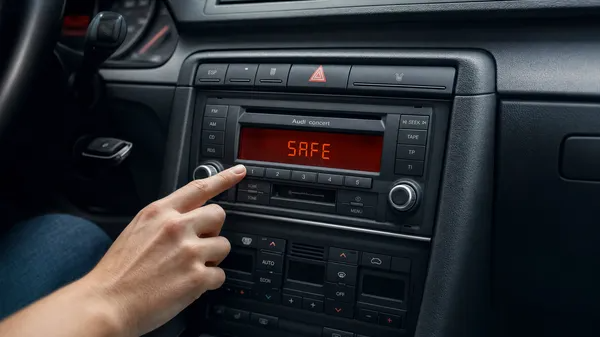

Encountering “SAFE” on your Audi radio display can be a moment of frustration, especially if you’re eager to get back to your favorite tunes. This message indicates that your radio’s anti-theft system has activated, typically after a power interruption like a battery change or fuse replacement. Understanding how Audi’s SAFE mode works and how to properly reset it is crucial for restoring your audio system.
What is Audi Radio SAFE Mode?
Audi radios are equipped with a security feature designed to prevent theft. If the radio is disconnected from its power source or moved to another vehicle, it enters “SAFE” mode. This requires a unique 4-digit PIN code to unlock and confirm it’s in its rightful place. There are two main states:
•SAFE 1: The initial lockout state. You can attempt to enter your code immediately.
•SAFE 2: A more stringent lockout that occurs if you enter an incorrect code twice. This state imposes a mandatory waiting period before you can try again.
The Crucial 60-Minute Wait for SAFE 2
If your Audi radio displays “SAFE 2” or simply “SAFE” but won’t let you enter a code after incorrect attempts, you’ve likely triggered the secondary lockout. To reset this, you must:
1.Turn the Ignition ON: Switch your car’s ignition to the “ON” position. The engine does not necessarily need to be running, but the radio must receive continuous power.
2.Turn the Radio ON: Ensure the radio is powered on and displaying the “SAFE” message.
3.Wait for 60 Continuous Minutes: Leave the radio powered on for a full 60 minutes without pressing any buttons or turning off the ignition. Any interruption will reset the timer.
Expert Tip: During this 60-minute wait, consider connecting a battery tender to your car’s battery. Leaving the ignition on for an extended period can drain your car battery, especially if it’s older. A tender will prevent this, ensuring your car starts after the reset.
After the 60 minutes, the display should revert to “SAFE” or “1000,” indicating it’s ready for code entry.
How to Enter Your Audi Radio Code
The exact button sequence to enter your 4-digit code varies slightly by Audi radio model. Here are the common procedures:
For Audi Chorus / Concert / Symphony I (Older Models)
1.Activate Code Entry: With the radio displaying “SAFE,” press and hold the TP (Traffic Program) and RDS (Radio Data System) buttons simultaneously until “1000” appears on the display.
2.Input Code: Use the radio preset buttons (usually 1-4) to enter each digit of your 4-digit code. For example, to enter ‘1234’, press button 1 once, button 2 twice, button 3 three times, and button 4 four times.
3.Confirm Code: Once the full code is displayed, press and hold the TP and RDS buttons again until the radio unlocks and begins playing.
For Audi Concert / Symphony II (Newer Models)
1.Activate Code Entry: With the radio displaying “SAFE,” press and hold the SCAN and RBDS buttons simultaneously until “1000” appears.
2.Input Code: Use the preset buttons (1-4) to enter each digit of your 4-digit code.
3.Confirm Code: Press and hold the SCAN or SEEK button (or sometimes the right arrow/”OK” button) until the radio accepts the code.
For Audi RNS-E (Navigation Plus)
1.Activate Code Entry: The RNS-E will typically prompt for the code directly after a lockout.
2.Input Code: Use the large control knob to select each digit of your 4-digit code on the screen. Press the knob to confirm each digit.
3.Confirm Code: Once all four digits are entered, select “OK” or press the control knob to confirm.
Where to Find Your Audi Radio Code
If you don’t have your radio code, you can typically find it:
•In your owner’s manual: Look for a “Radio Card” or sticker in the original documentation.
•From an Audi dealership: Provide your VIN and the radio’s AUZ serial number.
•Through a professional online service: Services like VWCODES.com can retrieve your code quickly using your radio’s unique AUZ serial number. This is often the fastest and most convenient option.
Conclusion
Audi’s SAFE mode is a robust anti-theft measure, but it’s easily overcome with the correct code and procedure. By understanding the difference between SAFE 1 and SAFE 2, patiently observing the 60-minute reset if necessary, and correctly entering your 4-digit PIN, you can quickly restore your Audi’s audio system. Always ensure you have your radio code handy, especially before any battery maintenance, to avoid unnecessary downtime. For reliable code retrieval, trusted online services offer a straightforward solution.