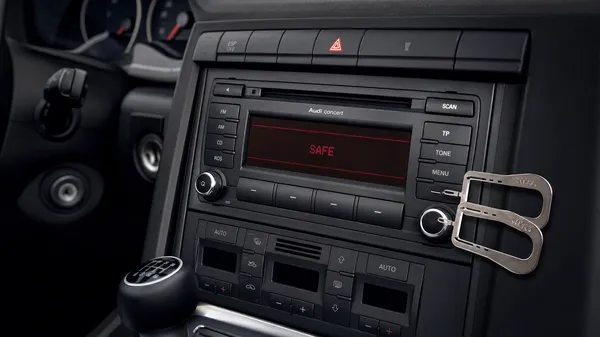

If your Audi radio is displaying “SAFE” or asking for a code, it means its anti-theft system has activated. This typically happens after a power interruption, such as a battery change, a flat battery, or a fuse replacement. To restore your audio system, you’ll need to enter a unique 4-digit PIN code. This comprehensive guide will walk you through identifying your Audi radio model, locating its serial number, and correctly entering the unlock code.
Understanding Audi Radio Security
Audi, like its Volkswagen Group counterparts, implements a robust anti-theft system for its car radios. Each radio unit is paired with a specific 4-digit security code stored in a centralized manufacturer database. This code is linked to the radio’s unique 14-digit serial number, which typically begins with “AUZ” (e.g., AUZ1Z2A1234567). Without this code, the radio will remain locked, preventing unauthorized use if removed from its original vehicle.
Identifying Your Audi Radio Model
Audi has used various radio models over the years, each with slightly different features and code entry procedures. Common models include:
•Audi Chorus: Often an entry-level unit, sometimes with a cassette player or basic CD functionality.
•Audi Concert: A popular mid-range option, frequently found in models like the A3, A4, and TT.
•Audi Symphony: A higher-end unit, often featuring a 6-CD changer and more advanced audio controls.
•Audi RNS-E (Navigation Plus): A sophisticated navigation system with a flip-down screen for SD card slots.
Knowing your specific model can help in finding the correct serial number location and code entry method.
Locating Your Audi Radio Serial Number (AUZ…)
The 14-digit serial number, starting with “AUZ,” is the key to retrieving your unlock code. It is almost always found on a sticker attached to the metal casing of the radio unit itself. To access this, you will need to remove the radio from the dashboard.
Tools Required for Removal
To safely remove your Audi radio, you will typically need a set of Audi radio removal keys (often referred to as T10057 tools). These are thin, flat metal keys that slide into slots on the faceplate of the radio.
Removal Steps (General)
1.Insert Removal Keys: Insert the four radio removal keys into the slots on each corner of the radio faceplate until you hear a click. The keys engage internal clips.
2.Pull the Radio: Gently pull the keys outwards and then pull the radio unit straight out of the dashboard. Do not force it.
3.Locate Serial Number: Once the radio is partially out, you should see a label on the top or side of the unit. Look for the “AUZ” serial number.
4.Disconnect (Optional): If you need to fully remove the radio, carefully disconnect the wiring harnesses and antenna cables from the back. Take a photo before disconnecting to aid reinstallation.
Alternative Serial Number Retrieval
For some newer Audi models, it might be possible to retrieve the serial number via diagnostic tools (like VCDS or ODIS) connected to the car’s OBD-II port, or through a hidden menu on the radio display. However, these methods are less common and often require specialized knowledge or equipment. For most cases, physical removal is necessary.
Obtaining Your Audi Radio Code
Once you have your radio’s 14-digit AUZ serial number, you have a few options to get the unlock code:
1.Original Documentation: Check your car’s owner’s manual or radio manual for a “Radio Card” or sticker. This is the ideal, free solution if available.
2.Audi Dealership: Provide your VIN and the radio’s AUZ serial number to an authorized Audi dealership. They can access the code from their database. Be prepared for potential fees and processing time.
3.Professional Online Service: Services like VWCODES.com specialize in retrieving Audi radio codes from their serial numbers. This is often the fastest and most convenient method, providing codes within minutes or hours. Ensure the service is reputable, offers secure payment (e.g., Stripe), and has a clear refund policy.
Entering Your Audi Radio Code
The code entry process can vary slightly depending on your Audi radio model. Here are general steps for common units:
For Audi Concert / Symphony I & II
1.Turn on the radio: It should display “SAFE” or “1000” (four dashes).
2.Access Code Entry: Press and hold the SCAN and RBDS buttons simultaneously (or sometimes TP and RDS) until “1000” appears on the display.
3.Enter the Code: Use the preset buttons (usually 1-4) to input each digit of your 4-digit code.
4.Confirm: Press and hold the SCAN or SEEK button (or sometimes the right arrow/”OK” button) until the radio accepts the code and resumes normal operation.
For Audi RNS-E (Navigation Plus)
1.Turn on the unit: It will display “SAFE.”
2.Enter the Code: Use the large control knob to select each digit of your 4-digit code on the screen. Press the knob to confirm each digit.
3.Confirm: Once all four digits are entered, select “OK” or press the control knob to confirm.
Handling “SAFE 2” Mode
If you enter an incorrect code twice, your Audi radio will enter “SAFE 2” mode. This is a more stringent lockout that requires the radio to be powered on with the ignition on (or engine running) for a continuous 60 minutes before you can attempt code entry again. Do not turn off the ignition or disconnect power during this period, as it will reset the timer.
Conclusion
Unlocking your Audi radio requires a systematic approach: identify your model, safely retrieve the AUZ serial number, and then obtain the correct 4-digit PIN. While dealerships are an option, reputable online services offer a fast and convenient alternative. Once you have the code, follow the specific entry procedure for your radio model, and you’ll soon be enjoying your Audi’s audio system once more. For reliable Audi radio codes and expert assistance, VWCODES.com is here to help.