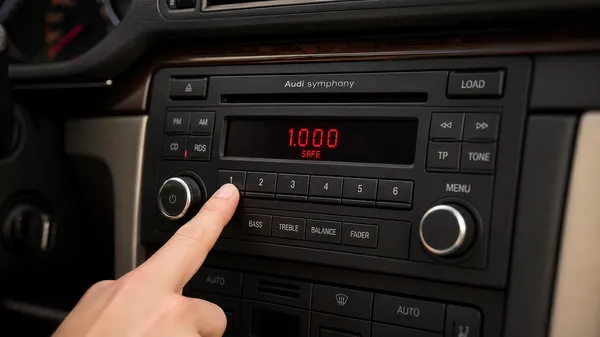

The Audi Symphony radio is a popular and robust infotainment system found in many Audi models. However, like other car radios, it can enter a security lockout mode, often displaying “SAFE” or requiring a code after a battery change, electrical work, or if the unit is moved between vehicles. At VWCODES.com, we understand the frustration of a locked radio. This guide will walk you through finding your Audi Symphony radio code and unlocking your system.
Why Your Audi Symphony Needs a Code
The “SAFE” mode is an anti-theft feature. When the radio loses continuous power, it activates this security measure to prevent unauthorized use. To restore full functionality, the correct four-digit security code must be entered.
Step 1: Locating Your Audi Symphony Radio Code
Finding your code is the most crucial step. Here are the common places to look:
•Owner’s Manual/Service Book: The code is frequently written on a sticker or card, often found in the front pages of your Audi owner’s manual or service history booklet. Look for a “Radio Card” or a handwritten note.
•Glove Compartment/Trunk: Sometimes, the code is placed on a sticker inside the glove compartment or near the spare tire well.
•On the Radio Unit Itself: The code might be printed on a label on the radio’s casing. This requires removing the radio from the dashboard. If you need assistance with radio removal, VWCODES.com offers detailed guides for various Audi models.
•Audi Dealership: Your local Audi dealership can retrieve the code using your vehicle’s VIN, though they typically charge a fee for this service.
•Online Retrieval Services: For a faster and often more affordable solution, VWCODES.com provides an online code retrieval service. You’ll need your radio’s serial number (usually starting with “AUZ”) to use this service.
Step 2: Entering the Code into Your Audi Symphony Radio
Once you have your four-digit code, follow these steps to unlock your Symphony radio:
1.Turn on the Ignition: Insert your key and turn the ignition to the “ON” position (without starting the engine).
2.Turn on the Radio: If the radio is off, turn it on. The display should show “SAFE.”
3.Activate Code Entry Mode: Press and hold the SCAN and RDS buttons simultaneously for a few seconds until “1000” appears on the display. (On some older Symphony models, this might be FM2 and DX).
4.Enter the Code: Use the radio preset buttons (1, 2, 3, 4) to enter your four-digit code:
•Press button 1 repeatedly until the first digit of your code is displayed.
•Press button 2 repeatedly until the second digit is displayed.
•Continue this for buttons 3 and 4 until all four digits of your code are correctly shown on the display.
5.Confirm the Code: Once the correct code is displayed, press and hold the SCAN and RDS buttons (or FM2 and DX) again for a few seconds until the radio beeps and begins playing, or the station frequency appears.
Dealing with “SAFE 2” Lockout
If you enter the wrong code twice, your Audi Symphony radio will display “SAFE 2.” This means the system has locked you out for a period to prevent further incorrect attempts.
How to resolve “SAFE 2”:
•Leave the radio ON and the ignition key in the “ON” position for approximately 60 minutes.
•Do not turn off the radio or the car during this hour.
•After 60 minutes, the display should revert to “SAFE,” allowing you to attempt code entry again.
Conclusion
Unlocking your Audi Symphony radio is a straightforward process once you have the correct code and know the steps. Don’t let a locked radio diminish your driving pleasure. For reliable code retrieval and comprehensive guides for your Audi and Volkswagen vehicles, always turn to VWCODES.com.