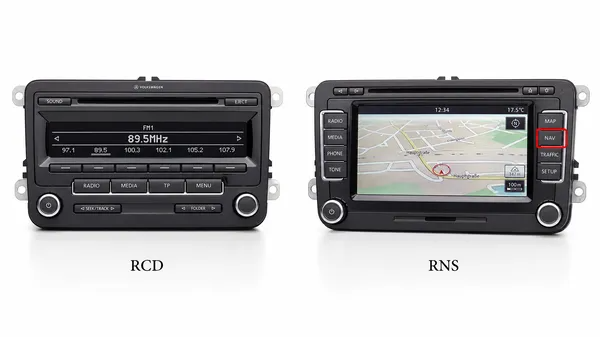

When you’re looking for a radio code, a firmware update, or a replacement part for your Volkswagen, the first question you’ll often be asked is: “What model is your radio?” For many owners, the difference between an RCD and an RNS unit isn’t immediately obvious. At VWCODES.com, we want to empower you with the knowledge to identify your system correctly. Here is our guide to the RCD vs. RNS debate.
The Basic Difference: Audio vs. Navigation
The easiest way to distinguish between the two main families of Volkswagen radios is their primary function.
•RCD (Radio Compact Disc): These are standard audio units. They focus on radio, CD playback, and sometimes SD card or Bluetooth audio. They do not have built-in GPS navigation.
•RNS (Radio Navigation System): These are premium units that include a built-in GPS navigation system. If your radio has a “NAV” button and a map display, it is an RNS model.
Common Models and Their Features
The RCD Series
•RCD 310: A simple unit with a black-and-white text display. It’s reliable and focuses on the basics.
•RCD 510: A popular upgrade featuring a large color touchscreen and a 6-disc internal CD changer. It looks similar to some navigation units but lacks the “NAV” button.
The RNS Series
•RNS 315: A smaller touchscreen unit with built-in navigation. It often has Bluetooth integrated directly into the head unit.
•RNS 510: The flagship navigation system for many years. It features a high-resolution screen, a built-in hard drive for maps and music, and a DVD player.
How to Find the Exact Model Number
If you need the specific part number (e.g., 1K0 035 180), there are three ways to find it:
1.The Startup Screen: Some units briefly display the model name (like “Welcome to Volkswagen RNS 510”) when you first turn them on.
2.The System Menu: Hold down the “Setup” button for about 10 seconds. On many models, this will open a hidden “Service Mode” or “Version Info” menu that lists the part number and firmware version.
3.Physical Inspection: The most certain way is to remove the unit. The model and part number are printed on a large white sticker on the top or side of the metal casing. If you need help removing your radio, VWCODES.com has step-by-step guides for most VW models.
Why Does Identification Matter?
Knowing your model is crucial for:
•Retrieving Radio Codes: Different models have different serial number formats.
•Software Updates: Installing the wrong firmware can “brick” your radio.
•Adding Features: Knowing your model helps you determine if you can add Bluetooth, a backup camera, or Apple CarPlay.
Conclusion
Identifying your VW radio model is the first step toward maintaining or upgrading your car’s tech. Whether you have a simple RCD 310 or a feature-rich RNS 510, VWCODES.com is here to provide the codes, guides, and support you need. Visit us today at VWCODES.com for all your Volkswagen radio solutions.