

Changing your car battery is a routine maintenance task, but for many Volkswagen owners, it comes with an unexpected surprise: a locked radio demanding a security code. This can be frustrating, especially if you’re not prepared. Understanding why your VW radio locks after a battery change and how to address it is crucial for a smooth driving experience.
The Anti-Theft Mechanism: Your Radio’s Guardian
Volkswagen radios are equipped with an advanced anti-theft security system. This system is designed to prevent unauthorized use of the radio if it’s stolen from your vehicle. When the radio’s power supply is interrupted – for instance, when you disconnect the car battery – it interprets this as a potential theft attempt. To protect itself, the radio enters a ‘SAFE’ mode, rendering it inoperable until a unique 4-digit security code is entered.
This security feature is a double-edged sword. While it effectively deters thieves, it can be an inconvenience for legitimate owners who simply perform routine maintenance. The radio essentially ‘forgets’ its authorized vehicle when power is lost, requiring re-authentication.
Common Scenarios Triggering a Radio Lockout
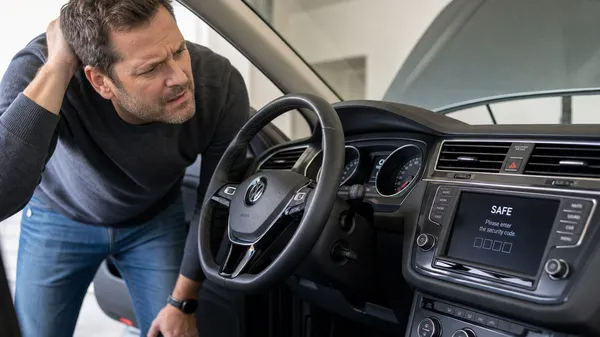
•Battery Replacement: The most common cause. Disconnecting the old battery and installing a new one cuts the continuous power supply to the radio.
•Fuse Replacement: If a fuse related to the radio or its constant power supply blows and is replaced, the radio will lose power and request the code.
•Major Electrical Work: Any significant electrical repair that requires disconnecting the battery for an extended period can trigger the anti-theft mode.
•Dead Battery: If your car battery completely dies and needs to be jump-started or replaced, the radio will likely enter SAFE mode.
How to Prevent Your Radio from Locking (Memory Savers)
While not always foolproof, you can take steps to try and prevent your radio from locking during a battery change:
•OBD-II Memory Saver: These devices plug into your car’s OBD-II port and connect to a separate 9V battery or a jump pack. They provide a continuous low-current power supply to the car’s electrical system, maintaining memory for components like the radio, clock, and ECU settings while the main battery is disconnected.
•Jump Pack/Auxiliary Battery: Connect a small 12V auxiliary battery or a jump pack directly to your car’s battery terminals (positive to positive, negative to negative) before disconnecting the main battery. This maintains power to the system. Exercise extreme caution when doing this to avoid short circuits.
Even with these precautions, some sensitive VW systems might still trigger the SAFE mode. It’s always best to have your radio code readily available.
What to Do When Your Radio is Locked
If your VW radio is already displaying “SAFE” or asking for a code, you have a few options:
1.Check Your Owner’s Manual/Radio Card: Many Volkswagens come with a small card or sticker in the owner’s manual or glove compartment that contains the 4-digit radio code. This is the easiest and fastest solution if available.
2.Locate the Serial Number: If you don’t have the code, you’ll need your radio’s unique serial number (typically starting with “VWZ”). This can often be found on a sticker on the radio’s casing, which may require partial removal of the unit. For some models, it can be accessed via a hidden menu on the radio screen or through diagnostic tools like VCDS or OBDeleven.
3.Use an Online Service: Once you have the serial number, reputable online services like VWCODES.com can provide you with the correct radio code quickly and efficiently. This is often a more affordable and convenient option than a dealership.
4.Contact a Dealership: Your local Volkswagen dealership can retrieve the code using your vehicle’s VIN and the radio’s serial number. Be prepared for potential fees and waiting times.
Conclusion
The anti-theft feature that locks your VW radio after a battery change is a security measure, not a malfunction. While it can be an inconvenience, understanding its purpose and knowing how to retrieve and enter your radio code will save you time and frustration. Always keep your radio code in a safe place, and consider using a memory saver during battery maintenance. If you find yourself locked out, reliable online services are available to help you get back to enjoying your music on the road.