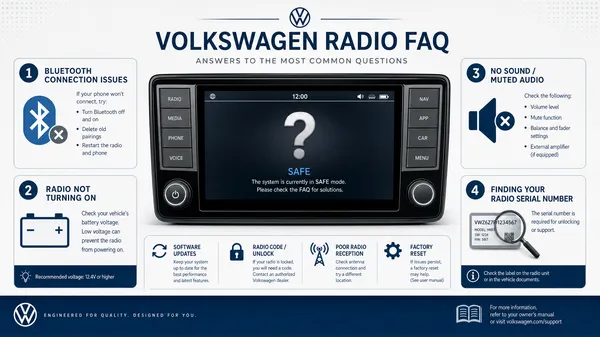

Experiencing issues with your Volkswagen radio can be frustrating, whether it’s a locked unit, a blank screen, or connectivity problems. This comprehensive FAQ addresses the most common questions Volkswagen owners have about their car radios, providing clear, expert-backed answers to get you back on track.
Why is my VW radio asking for a code or displaying “SAFE”?
This is a built-in anti-theft feature designed to prevent unauthorized use of your radio. It typically activates after a power interruption, such as a battery change, a flat battery, or a fuse replacement. The radio enters “SAFE” mode to ensure it’s in its rightful vehicle. You’ll need to enter a unique 4-digit PIN code to unlock it.
How do I find my Volkswagen radio code?
There are several reliable ways to retrieve your radio code:
1.Owner’s Manual/Radio Card: The code is often printed on a small, perforated card or sticker found within your car’s original owner’s manual or the radio’s specific manual. Always check here first.
2.Volkswagen Dealership: Your local VW dealership can access the manufacturer’s database to retrieve the code. You’ll need to provide your Vehicle Identification Number (VIN) and often the radio’s serial number, along with proof of ownership. Be aware that they may charge a fee for this service.
3.Professional Online Service: Reputable online services specialize in retrieving codes from your radio’s serial number. This is often the fastest and most convenient method, avoiding dealership visits. You’ll need to provide the 14-digit serial number (e.g., VWZ…).
What is the radio’s serial number and where do I find it?
The radio’s serial number is a unique identifier, typically a 14-digit alphanumeric code starting with “VWZ” (e.g., VWZ1Z2A1234567). It’s crucial for retrieving your radio code. You can usually find it:
•On the radio unit itself: This often requires removing the radio from the dashboard to access a sticker on its casing.
•Via diagnostic tools: For some models, the serial number can be read using diagnostic software like VCDS or OBDeleven, without needing to remove the unit.
•On original documentation: Sometimes listed on the radio card or service records.
My radio is in “SAFE 2” mode. What does that mean?
“SAFE 2” mode is a more severe lockout that occurs if you enter an incorrect radio code twice. When in SAFE 2, your radio will typically display a message indicating a waiting period, often 60 minutes. During this time, the radio must remain powered on with the ignition on (or the engine running) for the countdown to proceed. After 60 continuous minutes, the radio will allow you to attempt code entry again. It’s crucial not to turn off the ignition or disconnect power during this waiting period, as it will reset the timer.
How do I enter the radio code?
The exact steps can vary slightly by radio model, but the general procedure is:
1.Turn on the radio. It should display “SAFE” or “1000” (four dashes).
2.If it shows “SAFE”, press and hold the SCAN and RBDS buttons simultaneously (or sometimes MODE and SCAN) until “1000” appears.
3.Use the preset buttons (usually 1-4) to input each digit of your 4-digit code.
4.Press and hold the SCAN or SEEK button (or sometimes the right arrow/”OK” button) to confirm the code. The radio should then unlock and resume normal operation.
Why is my Bluetooth not connecting or working properly?
Bluetooth connectivity issues are common. Try these troubleshooting steps:
•Soft Reset: Turn off your car, remove the key, and wait a few minutes. Then restart and try pairing again.
•Delete Paired Devices: Go into your radio’s Bluetooth settings and delete all previously paired devices, then try to pair your phone again.
•Check Phone Settings: Ensure your phone’s Bluetooth is on and discoverable.
•Firmware Update: In some cases, an outdated radio firmware might cause issues. Consult a dealership for potential updates.
Can I reset my VW radio to factory settings?
Yes, most VW radios have a factory reset option. This will erase all saved settings, paired devices, and preset stations. The method varies:
•Through the menu: Navigate to the system settings or setup menu on your radio screen and look for a “Factory Reset” or “Restore Defaults” option.
•Hard Reset: Disconnecting the car battery for 15-30 minutes can perform a hard reset, but be aware this will likely trigger the radio’s anti-theft “SAFE” mode, requiring you to re-enter the code.
Will replacing my car battery lock my radio?
For many older Volkswagen models, yes, a battery replacement or disconnection will almost certainly trigger the radio’s anti-theft “SAFE” mode. Newer models with more integrated CAN-Bus systems might sometimes retain the code, but it’s always best to have your radio code handy before disconnecting the battery. Using a memory saver during battery replacement can help prevent the radio from locking.
Conclusion
Understanding your Volkswagen radio’s features and troubleshooting common issues can save you time and frustration. Whether you need to find a lost code, navigate SAFE mode, or resolve connectivity problems, reliable solutions are available. For accurate radio codes and expert support, consider using a trusted online service like VWCODES.com, ensuring your journey is always accompanied by your favorite tunes.
References
[1] Volkswagen Radio Code Guide: How To Access & Unlock It – Gunther VW Delray
[2] How to Get Your VW Radio Code – VWCODES.com
[3] VW Radio Code Generator: Fact vs. Fiction – VWCODES.com
[4] How to Find Your VW Radio Serial Number Without Removal – VWCODES.com
[6] Hard Reset Guide for VW Radio – TikTok
[7] VW Battery Replacement Guide: Why Your Radio Locks and How to Prevent It – VWCODES.com