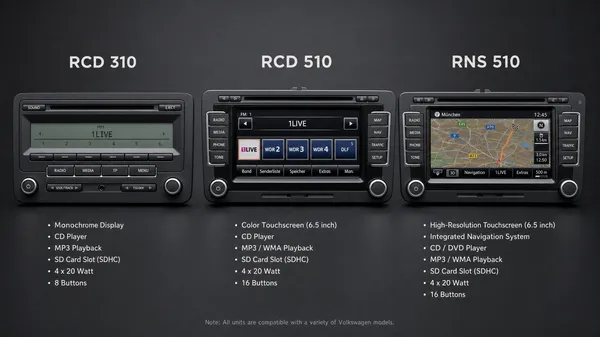

Navigating the world of Volkswagen infotainment systems can sometimes feel like deciphering a secret code. With various models like the RCD 310, RCD 510, and RNS 510, it’s common for owners to be unsure which unit is installed in their vehicle. Understanding your radio model is crucial, especially when troubleshooting issues, looking for upgrades, or needing a radio code. This comprehensive guide will break down the key differences, features, and identification tips for these popular VW radio systems, helping you confidently determine which one powers your drive.
The Volkswagen Radio Naming Convention Explained
Before diving into specific models, it’s helpful to understand Volkswagen’s naming convention for their head units:
•RCD (Radio Compact Disc): These units are primarily designed for audio playback, featuring a CD player and often auxiliary inputs. They generally do not include integrated navigation.
•RNS (Radio Navigation System): These units are the premium option, offering integrated GPS navigation alongside advanced audio features.
•MIB (Modular Infotainment Matrix): Representing a newer generation (typically from 2014 onwards), MIB systems offer more advanced features, including smartphone integration (Apple CarPlay, Android Auto) and faster processors. While not the focus of this comparison, it’s important to recognize this evolution.
A Detailed Comparison: RCD 310, RCD 510, and RNS 510
Let’s explore the distinct characteristics of each model:
1. Volkswagen RCD 310
The RCD 310 is often considered the entry-level radio system found in many Volkswagen models from the late 2000s to early 2010s. It’s a straightforward unit focused on essential audio functions.
•Screen Type: Features a small, rectangular monochrome or blue-backlit display. It is not a touchscreen.
•Navigation: Does not have built-in navigation capabilities.
•Key Features: Includes a single CD player, AM/FM radio, and often an auxiliary (AUX) input. Basic Bluetooth functionality might be available as an optional extra, usually requiring an external module.
•Identification Tip: Its distinct small, non-color screen and physical buttons are its most recognizable traits.
2. Volkswagen RCD 510
The RCD 510 represents a significant upgrade from the RCD 310, offering a more modern interface and enhanced multimedia features, though still without integrated navigation.
•Screen Type: Equipped with a larger 6.5-inch color touchscreen display. This is a resistive touchscreen, meaning it responds to pressure rather than just touch.
•Navigation: Does not have built-in navigation. While it has a large screen, it’s primarily for media and vehicle information.
•Key Features: Boasts a 6-CD changer (often located behind the screen), SD card slot for media playback, and support for a factory-fitted reverse camera (on some versions). Bluetooth is typically handled via an external module.
•Identification Tip: The large color touchscreen and the presence of a 6-CD changer are clear indicators. The SD card slot is usually located at the bottom of the unit.
3. Volkswagen RNS 510
The RNS 510 is the top-tier infotainment system from its generation, offering a full suite of multimedia and navigation features, making it a highly sought-after unit.
•Screen Type: Features a 6.5-inch high-resolution color touchscreen, similar in size to the RCD 510 but often with better clarity and responsiveness. This is also a resistive touchscreen.
•Navigation: Yes, it has integrated GPS navigation with detailed maps. This is its defining feature.
•Key Features: Includes a built-in hard drive (HDD) of 30-40GB for storing maps and media, a DVD player, SD card slot, and voice control capabilities. It can display parking sensor information and integrate with a reverse camera.
•Identification Tip: The presence of a dedicated”NAV” button and the ability to display detailed maps are key. The SD card slot is typically located on the front panel.
Quick Identification Guide
To quickly identify your Volkswagen radio model, consider these factors:
| Feature / Model | RCD 310 | RCD 510 | RNS 510 |
| Screen Type | Small, Monochrome/Blue | 6.5″ Color Touchscreen | 6.5″ High-Res Color Touchscreen |
| Touchscreen | No | Yes (Resistive) | Yes (Resistive) |
| Navigation | No | No | Yes |
| CD Changer | Single CD | 6-CD Changer | Single CD (with DVD playback) |
| Hard Drive | No | No | Yes (30-40GB) |
| SD Card Slot | No | Yes (Bottom) | Yes (Front) |
| “NAV” Button | No | No | Yes |
| Bluetooth | Optional (External) | Optional (External) | Integrated |
Why is Knowing Your Radio Model Important?
Knowing your specific radio model is crucial for several reasons:
•Troubleshooting: Different models have different common issues and troubleshooting steps. For example, a black screen on an RCD 310 might indicate a different problem than on an RNS 510.
•Upgrades: If you plan to upgrade your infotainment system, knowing your current model helps determine compatibility and necessary adapters.
•Radio Codes: While all these units require a radio code after a power disconnection, the process of finding the serial number or entering the code can vary slightly between models. For instance, some RNS units might have hidden menus that display serial numbers, which are not present on basic RCD units.
•Part Replacement: When ordering replacement parts or accessories, the exact model number ensures you get the correct components.
Need a Radio Code? We Can Help!
Regardless of your Volkswagen radio model – be it an RCD 310, RCD 510, RNS 510, or even a newer MIB unit – if your radio is locked in “SAFE” mode, you will need its unique 4-digit PIN code to restore functionality. At VWCODES.com, we specialize in providing fast and reliable radio codes for all Volkswagen models.
Our service is designed to be straightforward and efficient:
1.Find Your Serial Number: Use our comprehensive guides (including methods that don’t require radio removal) to locate your radio’s 14-digit serial number (e.g., VWZ…). If you need assistance, our expert support team is ready to help.
2.Submit Your Serial Number: Enter your serial number on our secure platform.
3.Receive Your Code: We will quickly process your request and provide you with the correct radio code, often within minutes.
We pride ourselves on our deep technical knowledge of Volkswagen systems, ensuring accurate code retrieval. Our secure payment processing via Stripe and transparent refund policy offer peace of mind. Check our customer reviews on Trustpilot and Google Reviews to see why thousands of VW owners trust us to get their music back on the road.
Conclusion
Identifying your Volkswagen radio model is the first step towards understanding its capabilities and resolving any issues. Whether you have the robust RCD 310, the feature-rich RCD 510, or the advanced RNS 510, each unit offers a unique set of functionalities. By using this guide, you can confidently pinpoint your radio model and take the necessary steps to maintain or enhance your in-car audio experience. And remember, for any radio code needs, VWCODES.com is your reliable partner.