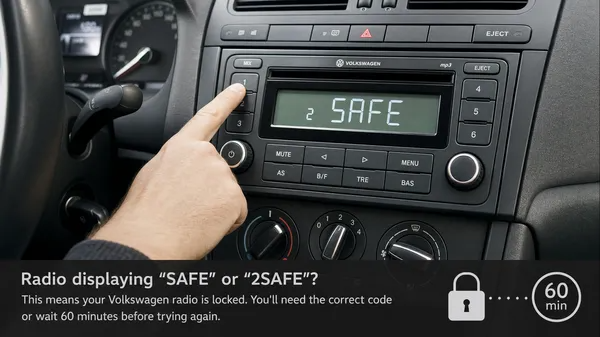

Encountering the word “SAFE” or “2SAFE” on your Volkswagen radio display can be a moment of frustration for any car owner. This message is not a sign of a broken radio, but rather an active anti-theft security feature designed to protect your stereo system. Understanding why your radio enters SAFE mode and knowing the correct steps to reset and unlock it is crucial for restoring your in-car audio. This comprehensive guide will walk you through everything you need to know about Volkswagen radio SAFE mode, from its triggers to the precise steps for code entry and lockout resets.
What is Volkswagen Radio SAFE Mode?
Volkswagen radios are equipped with an integrated anti-theft system. If the radio loses power – for instance, during a battery change, a fuse replacement, or if the unit is disconnected from the vehicle – it will automatically enter SAFE mode. This is a protective measure to prevent unauthorized use if the radio is stolen. To reactivate the radio, you must enter a unique 4-digit PIN code.
There are two primary states of SAFE mode you might encounter:
1. SAFE 1 (or “1000”)
This is the initial lockout state. When your radio first enters SAFE mode, it will typically display “SAFE” or “1000” (or four dashes) on the screen. This indicates that the radio is ready for you to input your 4-digit security code. You have a limited number of attempts to enter the correct code before the radio progresses to SAFE 2.
2. SAFE 2 (or “2SAFE”)
If you enter the incorrect PIN code twice, your radio will transition into “2SAFE” mode. This is a more severe lockout, acting as a penalty for incorrect entries. In this state, the radio will not allow immediate code entry. Instead, it initiates a mandatory waiting period.
The Crucial 60-Minute Reset for SAFE 2
The “2SAFE” message signifies that your radio has entered a time-based lockout. There is no shortcut or bypass for this. To clear the “2SAFE” message and return to the code entry screen (SAFE 1 or “1000”), you must follow a specific procedure:
1.Turn the Ignition ON: Insert your car key into the ignition and turn it to the “ON” position (usually the second click, where dashboard lights illuminate, but the engine is not necessarily running). For push-button start vehicles, press the start button without pressing the brake pedal.
2.Turn the Radio ON: Ensure your radio unit is powered on. It should display “2SAFE”.
3.Wait for 60 Continuous Minutes: Leave the ignition in the “ON” position and the radio powered on for a full, uninterrupted 60 minutes. It is critical not to turn off the ignition, turn off the radio, or remove the key during this period, as doing so will reset the 60-minute timer.
4.Monitor Battery: If your engine is not running, consider connecting a battery tender or charger to your car battery to prevent it from draining during the waiting period. This is especially important for older batteries or in colder climates.
5.Code Entry Ready: After 60 minutes, the display should automatically change from “2SAFE” back to “SAFE” or “1000” (four dashes), indicating that it is now ready for you to enter the correct 4-digit PIN code.
How to Enter Your Volkswagen Radio Code
Once your radio is in SAFE 1 mode (displaying “SAFE” or “1000”), you can proceed with entering your 4-digit PIN. The exact method for code entry can vary slightly depending on your specific radio model (e.g., RCD 310, RCD 510, RNS 510, or MIB systems).
General Code Entry Steps:
1.Display “1000”: If your radio displays “SAFE”, press and hold the SCAN and RBDS buttons simultaneously (or sometimes MODE and SCAN) until “1000” appears on the screen. Release the buttons.
2.Enter the First Digit: Use the first preset button (usually labeled “1”) repeatedly to cycle through numbers until the first digit of your code is displayed.
3.Enter Subsequent Digits: Repeat this process for the second, third, and fourth digits of your code using the corresponding preset buttons (“2”, “3”, and “4”).
4.Confirm the Code: Once all four digits of your code are correctly displayed, press and hold the SCAN or SEEK button (sometimes the right arrow button or “OK”) for a few seconds until the radio beeps or the display changes, indicating the code has been accepted.
Important Note: Always refer to your radio’s specific owner’s manual for the precise button combinations for code entry, as these can differ between models and years.
Where to Find Your Volkswagen Radio Code
Your 4-digit radio PIN code is unique to your stereo unit. It is typically found in one of the following locations:
•Owner’s Manual / Radio Manual: Look for a small, perforated “Radio Card” or a sticker within your vehicle’s original documentation.
•Vehicle Data Sticker: In some older models, a sticker in the trunk (often near the spare tire) or inside the service book might contain the code.
•Dealership Records: A Volkswagen dealership can often retrieve the code using your vehicle’s VIN and the radio’s serial number.
•Directly on the Radio Unit: The serial number (e.g., VWZ…) is printed on a label on the side or top of the radio unit itself. This serial number is what is used to generate the PIN code.
If you cannot find your code through these methods, you will need to retrieve the radio’s 14-digit serial number. For detailed instructions on how to do this, including methods that don’t require removing the radio, please refer to our comprehensive guides:
•The Ultimate Guide to Unlocking Your Volkswagen Radio: Removal, Serial Number, and Code Entry
•How to Find Your VW Radio Serial Number Without Removal
Common Myths About Bypassing SAFE Mode
Many myths circulate online about how to bypass Volkswagen radio SAFE mode without the code. It’s important to understand that these are generally ineffective and can sometimes cause further damage:
•Freezing the Radio: There is no scientific basis for this. It will not work.
•Leaving Unplugged: Disconnecting the radio for an extended period does not remove the need for the code; the security information is stored in non-volatile memory.
•Random Button Combinations: While some button combinations are used for code entry, there is no universal “master code” or bypass sequence that negates the need for your specific PIN.
The only legitimate way to unlock a Volkswagen radio in SAFE mode is with its correct 4-digit PIN code, which is linked to the unit’s unique serial number.
Why Choose VWCODES.com for Your Radio Code?
When your Volkswagen radio is locked, you need a fast, reliable, and accurate solution. At VWCODES.com, we provide a professional service to retrieve your radio code, ensuring you get back on the road with your music quickly.
•Accuracy: Our systems are designed to provide the correct code based on your radio’s unique serial number.
•Speed: We understand the urgency. Our streamlined process aims to deliver your code promptly.
•Support: Our team is knowledgeable about Volkswagen radio systems and can guide you through the process of finding your serial number and entering the code.
•Trust: We offer secure payment processing via Stripe and a transparent refund policy if we are unable to provide your code. Our customer reviews on Trustpilot and Google Reviews reflect our commitment to customer satisfaction.
Conclusion
Volkswagen radio SAFE mode is a robust anti-theft feature. While it can be an inconvenience, understanding its purpose and the correct procedures for resetting the lockout and entering your code will save you time and frustration. Remember the crucial 60-minute wait for “2SAFE” mode and always have your 4-digit PIN ready. If you’re struggling to find your code or serial number, VWCODES.com is your trusted partner for a quick and reliable solution, getting your Volkswagen radio unlocked and your tunes playing again.